





Price: ₹1,499.00
(as of Apr 05, 2025 13:10:08 UTC – Details)

Product Description

Movie Studio: For memories that last forever
MAGIX Movie Studio 2023 Suite is an entry-level video editing solution for aspiring videographers. Cut and edit footage without any prior knowledge using a wide range of easy-to-use tools. The software’s intuitive interface is just as important as its optimized workflow, continuously improved speed, and a wide range of creative content and unique effects. All of this has helped MAGIX Movie Studio 2023 Suite remain the best-selling video editing program in the region of Germany, Austria, and Switzerland and MAGIX’ most successful product line.
HIGHLIGHTS
• Diverse editing tools
• Completely customizable program interface & one of a kind multiformat timeline
• Project & export templates – even for social media
• Around 1500 effects, transitions, titles & integrated image stabilization
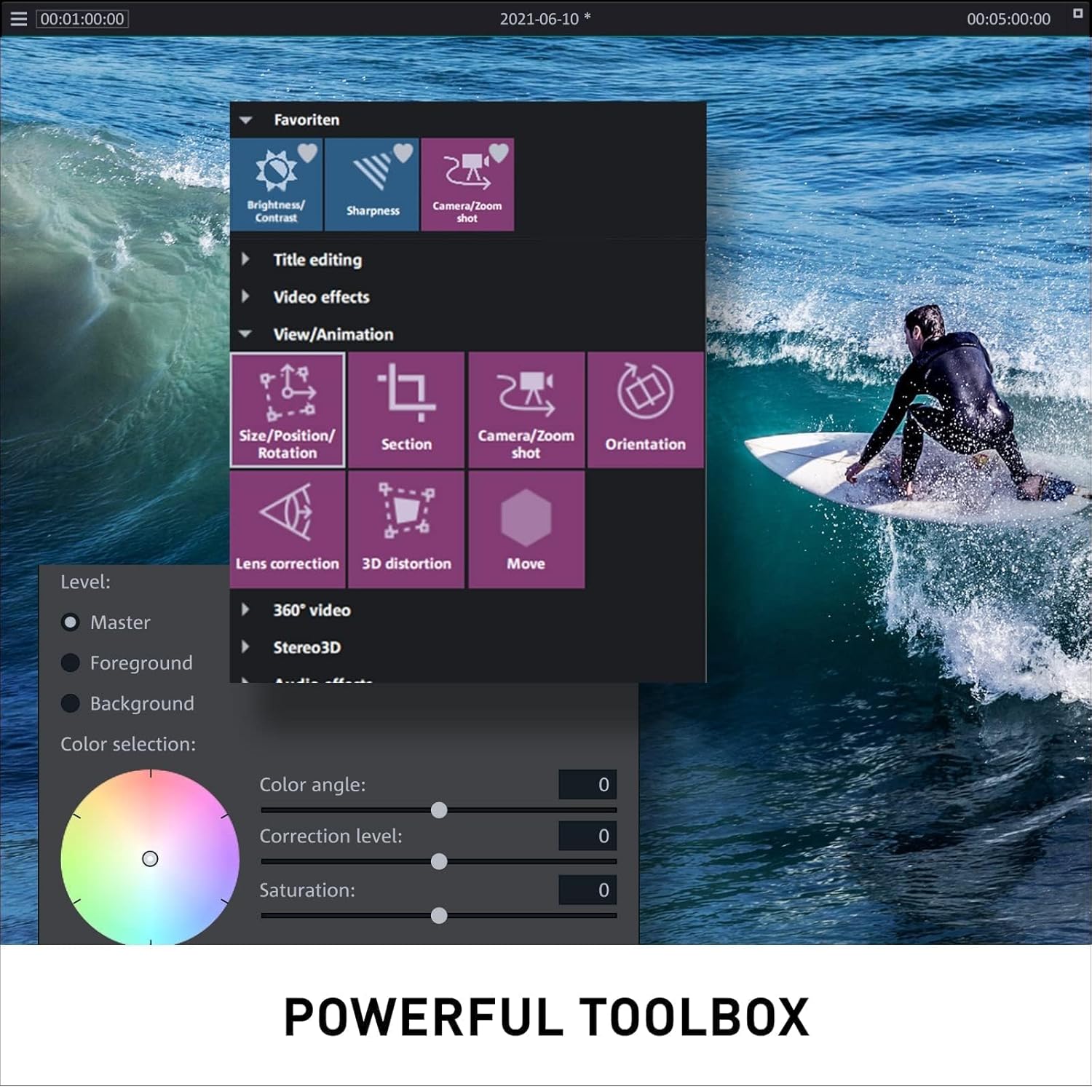
• Easy-to-use color correction
• 8K Ultra HD support & HiDPI program interface for razor-sharp videos
• Export to DVD, Blu-ray Disc, YouTube, Vimeo, and as files
• Accelerated export and smooth project playback with INFUSION Engine 3 support for Intel, NVIDIA and AMD cards
• Multi-GPU support – use multiple graphics cards simultaneously
• MAGIX Content (exclusively included with a subscription)
• Bundles: NewBlue Stylizers 5 Ultimate, NewBlue Essentials 5 Ultimate

Easy, fast & professional
Whether shot quickly with your cell phone or filmed professionally, turn your footage into stunning, high-quality movies with Movie Studio in only a few minutes.

Achieve impressive results, fast
Enjoy footage that’s more lifelike than ever before. Use the versatile deep colour correction to get the most out of your material, create a one-of-a-kind mood, and showcase each and every scene. All this backed by a fast engine that delivers results faster and more efficient than ever before

Just the right Colours
Make your footage more lifelike than ever with Colour grading that lets you get the most out of your footage, create unique moods, and put your scenes in the right light.

Image and text in motion
Add the finishing touches to your videos with animations. Even beginners can effortlessly design and animate texts and graphics thanks to a wide range of templates. Create movies that shine – no previous experience or complicated steps necessary.

For creative time management
Tension, suspense, and drama – enjoy unimagined creative possibilities by changing pace and using slow motion in high quality. With just a few clicks, your favourite footage can become a stand-out moment in your movie.

Video editing on any PC
From entry-level devices to high-end workstations, Movie Studio lets you get the most out of your hardware and work smoothly on any setup. Get started right away!


Minimum System Requirements
Operating system: Windows 10 | 11 Processor: Dual-core processor with 2.4 GHz (Intel quad-core processor with 2.8 GHz or better recommended) RAM: 4 GB (8 GB recommended) Graphics card: Onboard, min. resolution 1280 x 1024, 512 MB VRAM and DirectX 11 support (recommended: Intel Graphics HD 520 for MPEG2/AVC/HEVC) Available drive space: 2 GB for program installation (10 GB recommended) Internet connection: Required for registering and validating the program, as well as for some program features. Program requires one-time registration.

SEE. HEAR. FEEL. CREATE.
We believe in the magic of video and audio. That’s why we’ve been developing world-class software for creating, organizing, and publishing movies and music for more than 25 years. Millions of people and thousands of media companies use our solutions worldwide to share their stories, promote their brands – whether in soundtracks, movies, photos, graphics, or on websites.
And with success, too: Productions made with MAGIX software have won Oscars and reached the top of the charts. Thanks to automation, efficient workflows, and user-friendly advanced features, media houses, artists, production teams, and creative enthusiasts are able to turn their creative visions into a reality.
DISCOVER ALL THE BENEFITS OF THE SUITE VERSION: With a wide range of editing tools including multicam editing for 4 cameras, detailed color correction, up to 1,500 effects, titles, templates & transitions, automatic shot match, NewBlue Stylizers 5 Ultimate, and NewBlue Essentials 5 Ultimate.
EASY TO USE, FAST, PROFESSIONAL: Whether shot quickly with your cell phone or filmed professionally, turn your footage into stunning, high-quality movies in only a few minutes with Movie Studio.
EVERYTHING YOU NEED: With its wide range of cutting tools, the video editing program enables you to make each and every one of your ideas a reality – while benefiting from the latest technology. Work with detailed color correction, video stabilization and LUTs. The optimized high-speed timeline allows you to navigate projects smoothly and gives you full overview and control even of large amounts of material.
MAGIX TRAVEL MAPS: Create custom animations of your travel routes in seconds with this video editing software. Now with brand-new features like fly-in animations, filter view and GPX elevation profiles.
MADE IN GERMANY: Get the MAGIX video editing program, developed directly by the German manufacturer.
Within 2 hours of ordering, registration link and configuration instructions will be available in ‘Buyer/Seller messages’ under Message Center at “amazon.in/msg” and your Amazon regd. email ID
Software Voucher code along with Redemption instructions will be delivered in an e-mail. If your account does not have an email ID on amazon, Please register the same before purchasing.





Leave feedback about this